
Smart locks with keyless entry are transforming home security by offering convenient, key-free access that can be managed remotely. The best models balance security features, ease of installation, and smart home integration. The eufy Security Smart Lock C220 stands out as the overall best choice for its reliable fingerprint access and straightforward setup. For those seeking budget-friendly options, the VEISE VE06-L provides solid performance at a lower price point. Keep in mind, tradeoffs often involve choosing between advanced features like Wi-Fi connectivity and simpler, more affordable designs. Continue reading for a detailed breakdown of the top options, their strengths, and tradeoffs.

Get your wardrobe favorites delivered free — and shop member deals
- Fast, free delivery on millions of items
- Access to Prime Big Deal Days deals on October 6–7
- Prime Video, Amazon Music and more included
Key Takeaways
- The top-ranked locks combine security features with easy installation and smart home compatibility.
- Wi-Fi connectivity often comes with higher price tags but offers remote management and alerts.
- Biometric options like fingerprint access are convenient but may sacrifice some durability or security compared to traditional keypads.
- Budget models tend to focus on essential functions and may lack advanced features like auto-lock or remote control.
- User experience varies: some locks are better for tech-savvy users, others for straightforward, reliable operation.
| eufy Security Smart Lock C220, Fingerprint Keyless Entry Door Lock |  | Best Overall for Versatile Keyless Entry and Eufy Ecosystem Integration | Unlock Methods: Fingerprint, keypad, app, voice (Alexa/Google), physical key | Battery Life: 8 months | Batteries: 8 AA batteries | VIEW ON AMAZON | See Our Full Breakdown |
| Veise VE06-L Smart Deadbolt Lock with 2 Lever Handle Set, Matte Black |  | Best for Versatile Access and Durable Weatherproof Design | Material: Zinc alloy | Weatherproof Rating: IP54 | Grade: BHMA/ANSI Grade 3 | VIEW ON AMAZON | See Our Full Breakdown |
| Schlage Encode Smart WiFi Deadbolt Lock with Century Trim, Matte Black |  | Best for High Security and Remote Management via App | Connectivity: WiFi | Finish: Matte Black | Battery: Four AA batteries (included) | VIEW ON AMAZON | See Our Full Breakdown |
| Philips WiFi Keypad Deadbolt with Handle, Built-in WiFi, App Remote Control |  | Best for DIY Installers Who Want Multiple Access Methods | Connectivity: WiFi (2.4GHz) | Auto-Lock: Yes, customizable from 0-180 seconds | Batteries Included: No | VIEW ON AMAZON | See Our Full Breakdown |
| eufy Security Smart Lock C33 with Keypad and Wi-Fi |  | Best for Quick Installation and Broad Compatibility | Brand: eufy Security | Model Number: T85L0111 | Recommended Uses: Front, side, bedroom, garage doors | VIEW ON AMAZON | See Our Full Breakdown |
| TEEHO TE001 Keyless Entry Deadbolt with Keypad for Front Door, Satin Nickel |  | Best Budget-Friendly Keyless Deadbolt | Material: Aluminum alloy | Color: Satin Nickel | Power: 4 AA batteries (not included) | VIEW ON AMAZON | See Our Full Breakdown |
| Philips Wi-Fi Smart Deadbolt Lock, Keyless Entry Door Lock |  | Best for Smart Home Integration and Remote Access | Brand: PHILIPS | Model Number: DDL242X-1HW | Included Components: 1 x door lock | VIEW ON AMAZON | See Our Full Breakdown |
| Smart Door Handle Lock with Keypad and Fingerprint for Front Door |  | Best for Multi-Method Access and Easy DIY Installation | Brand: Yamiry | Recommended Uses: Suitable for Indoors and Exterior doors | Number of Pieces: 1 | VIEW ON AMAZON | See Our Full Breakdown |
| Keypad Smart Door Knob Lock, Yamiry Keyless Entry Digital Lock with Handle |  | Best for Easy, Compact Keyless Entry | Material: Aluminum alloy | Weather Resistance: IP54 | Number of User Codes: 20 | VIEW ON AMAZON | See Our Full Breakdown |
| Veise VE017 Fingerprint Smart Door Lock with App Control, Matte Black |  | Best for Advanced Security and Biometric Access | Material: All-zinc alloy, scratch-resistant | Battery Life: ≥12 months | Power Source: 4 AA batteries (not included) | VIEW ON AMAZON | See Our Full Breakdown |
| TEEHO TE001 Keyless Entry Deadbolt with Keypad for Front Door, Matte Black |  | Best Value for Reliable Keyless Deadbolt | Material: Aluminum alloy | Color: Matte Black | Power: 4 AA batteries (not included) | VIEW ON AMAZON | See Our Full Breakdown |
| Ulecoce Fingerprint Keypad Deadbolt with Knob Set, Keyless Entry Door Lock with App Control, Auto Lock & One-Touch Lock, 100+ User Codes & 5 Keys, Matte Black | 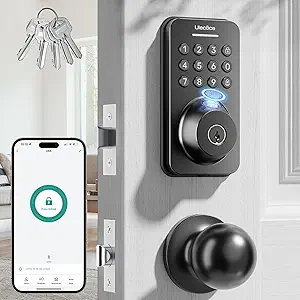 | Best for Tech-Savvy Homeowners Wanting Multiple Unlocking Methods | Material: Matte Black Finish | Fingerprint Storage: 512 fingerprints | Number of User Codes: 100+ | VIEW ON AMAZON | See Our Full Breakdown |
| Wyze Auto-Lock Bolt v2 Smart Lock with Fingerprint, Wi-Fi, and Key Backup |  | Best for Tech-Forward Users Seeking Wi-Fi Enabled Convenience | Brand: WYZE | Model Number: WLCKB2 | Weather Resistance: IP53 | VIEW ON AMAZON | See Our Full Breakdown |
| Keypad Door Lock with Handle, Keyless Entry & Code for Front Door |  | Best for DIY Installers and Multi-User Access | Brand: NICE DIGI | Model: Z1A | Number of Pieces: 26 | VIEW ON AMAZON | See Our Full Breakdown |
| smart locks keyless entry | Battery Life |
|---|---|
| eufy Security Smart Lock C220 | 8 months |
| Veise VE06-L Smart Deadbolt Lo | Exceeds 10 years |
| Schlage Encode Smart WiFi Dead | Up to 6 months |
| Philips WiFi Keypad Deadbolt w | — |
| eufy Security Smart Lock C33 w | — |
| TEEHO TE001 Keyless Entry Dead | Up to 365 days |
| Philips Wi-Fi Smart Deadbolt L | — |
| Smart Door Handle Lock with Ke | — |
| Keypad Smart Door Knob Lock | — |
| Veise VE017 Fingerprint Smart | ≥12 months |
| TEEHO TE001 Keyless Entry Dead | Up to 365 days |
| Ulecoce Fingerprint Keypad Dea | — |
| Wyze Auto-Lock Bolt v2 Smart L | Up to 8 months |
| Keypad Door Lock with Handle | 8-12 months with 4 AA batteries |
More Details on Our Top Picks
eufy Security Smart Lock C220, Fingerprint Keyless Entry Door Lock
The eufy Security Smart Lock C220 stands out for offering multiple unlocking methods, including fingerprint, keypad, app, voice commands, and physical key, making it extremely flexible for various user preferences. Its self-learning AI enhances fingerprint recognition over time, ensuring faster and more accurate access, which gives it a clear edge over simpler keypad-only options like the Philips WiFi Keypad Deadbolt. Installation is quick—around 15 minutes—and it’s compatible with most standard deadbolts, plus integrates seamlessly into the eufy smart home ecosystem. The main tradeoff lies in its BHMA Grade 3 security level, which is sufficient for many homes but may not satisfy those seeking the highest security standards. Battery life of approximately 8 months is decent but requires periodic replacement. Compared to the Schlage Encode, it offers more unlocking methods but with slightly less security certification, making it ideal for tech-savvy households that value flexibility.
Pros:- Multiple convenient unlocking options including fingerprint and app control
- Self-learning AI improves fingerprint accuracy over time
- Easy installation with minimal tools and compatibility with existing deadbolts
- Long-lasting battery life of 8 months
Cons:- Battery replacement required approximately every 8 months
- Limited to BHMA Grade 3 security rating
- No hardwired backup option
Best for: Homeowners who want a highly adaptable lock with AI-enhanced fingerprint recognition and ecosystem integration.
Not ideal for: Security-conscious users needing a Grade 1 or Grade 2 lock for high-security applications or those wary of frequent battery changes.
- Unlock Methods:Fingerprint, keypad, app, voice (Alexa/Google), physical key
- Battery Life:8 months
- Batteries:8 AA batteries
- AI Recognition:Self-learning fingerprint recognition
- Wi-Fi:Built-in, no bridge required
- Compatibility:Most standard deadbolts, bores under 54mm
- Installation Time:15 minutes
- Certification:BHMA Grade 3
- Operating Temperature:-22℉ to 158℉ (-30℃ to 70℃)
Our verdict“This pick is best suited for users seeking flexible access methods and simple installation, but those prioritizing top-tier security should consider higher-grade options.”
Veise VE06-L Smart Deadbolt Lock with 2 Lever Handle Set, Matte Black
The Veise VE06-L offers a comprehensive set of access options—app, codes, IC cards, and voice control when paired with a gateway—making it a flexible choice for both residential and rental properties. Its zinc alloy construction and weatherproof rating of IP54 ensure durability in diverse climates, a step above basic electronic locks like the Philips WiFi keypad deadbolt. The long battery life exceeding 10 years reduces maintenance, and its user-friendly app provides remote management and detailed access logs. A notable tradeoff is the need for a separate G2 gateway for voice control and remote access, adding complexity and cost for some users. Compared with the Schlage Encode, it emphasizes durability and long-term use over built-in Wi-Fi, making it ideal for users who want robust, all-weather performance and multiple access options.
Pros:- Multiple unlocking options including app, codes, IC cards, and voice control with gateway
- Weatherproof zinc alloy build for long-term outdoor use
- Extended battery life with over 10 years of operation
- Remote management and access logs via user-friendly app
Cons:- Requires separate G2 gateway for remote and voice features
- Some features may involve a learning curve or setup complexity
- Price may be higher due to additional gateway requirement
Best for: Rental property managers or homeowners seeking a durable, all-weather lock with multiple access modes and remote management.
Not ideal for: Users who prefer a simple, out-of-the-box solution without additional gateways or complex setups.
- Material:Zinc alloy
- Weatherproof Rating:IP54
- Grade:BHMA/ANSI Grade 3
- Battery Life:Exceeds 10 years
- Compatibility:Most U.S. doors (1-3/8″ to 2″ thickness)
- Control Options:App, codes, IC cards, voice (with gateway)
Our verdict“This lock is ideal for users who prioritize durability and multiple access options, accepting additional setup for remote features.”
Schlage Encode Smart WiFi Deadbolt Lock with Century Trim, Matte Black
The Schlage Encode is a standout for its high security rating, easy installation, and robust remote features. Its built-in WiFi lets you control and monitor your lock from anywhere using the Schlage Home app, and it integrates smoothly with Alexa and Google Assistant for voice commands—comparable to the Veise and eufy options but with a stronger emphasis on security credentials. Its built-in alarm and secure encryption add layers of safety, making it suitable for those who want peace of mind. However, it requires a WiFi connection for remote functionality, which could be a limitation during outages, and battery life may vary with heavy usage. Compared to the eufy C220, it offers higher security certification and a more established brand reputation, ideal for users prioritizing security and convenience.
Pros:- Remote access and control via mobile app from anywhere
- Compatible with Alexa and Google for voice commands
- Easy installation without hardwiring
- Built-in alarm and high BHMA security rating
Cons:- Requires WiFi for remote features, susceptible to connection issues
- Battery life may vary based on usage patterns
- Higher price point compared to some alternatives
Best for: Homeowners seeking a high-security, WiFi-enabled lock with easy DIY installation and voice control.
Not ideal for: Users in areas with unreliable WiFi or those who want a less complex, purely Bluetooth-based lock.
- Connectivity:WiFi
- Finish:Matte Black
- Battery:Four AA batteries (included)
- Battery Life:Up to 6 months
- Backset:2-3/8 in or 2-3/4 in
- Door Thickness:1-3/8 in to 1-3/4 in
- Alarm:Built-in customizable alarm
- Security Rating:Highest BHMA rating
Our verdict“Perfect for security-focused users who want reliable remote management and seamless voice control without extra hubs.”
Philips WiFi Keypad Deadbolt with Handle, Built-in WiFi, App Remote Control
The Philips WiFi Keypad Deadbolt offers a straightforward DIY solution with a combination of keypad, fingerprint, and remote app control, making it suitable for users who prefer control without complex setups. Its easy installation and compatibility with most doors are clear advantages over more complicated smart locks like the Veise or eufy models that require gateways or extra hardware. The fingerprint access unlocks in just 0.3 seconds, providing quick entry, while auto-lock ensures security when needed. A notable tradeoff is that batteries are not included, adding an extra step for setup, and the auto-lock feature needs manual activation from within the app. The lock’s WiFi range and reliance on strong signal might limit functionality in larger homes.
Pros:- Easy DIY installation with included hardware
- Fast fingerprint unlocking in 0.3 seconds
- Multiple access options including keypad and app
- Auto-lock feature enhances security
Cons:- Batteries are sold separately
- Auto-lock requires manual setup within the app
- Limited compatibility with certain smart home systems
Best for: DIY enthusiasts who want quick installation with multiple access methods without relying on hubs or gateways.
Not ideal for: Users seeking a fully integrated smart home ecosystem or those who want a lock with built-in voice control capabilities.
- Connectivity:WiFi (2.4GHz)
- Auto-Lock:Yes, customizable from 0-180 seconds
- Batteries Included:No
- Battery Type:Standard 1.5V alkaline
- Fingerprint Access:Yes, unlock in 0.3 seconds
- Supported Doors:Thick 1-3/8″ to 1-3/4″
- Installation:DIY, requires screwdriver
- Includes:Handle set, mounting hardware, user manual
Our verdict“Ideal for DIYers wanting quick, reliable access with multiple entry options and simple installation, but not suited for those wanting integrated voice control out of the box.”
eufy Security Smart Lock C33 with Keypad and Wi-Fi
The eufy Security Smart Lock C33 emphasizes quick, hassle-free installation, taking approximately 15 minutes, which makes it appealing for users seeking a straightforward upgrade. Equipped with a keypad and fingerprint recognition, it offers fast, keyless access at the front or side doors. Its built-in Wi-Fi allows remote control via the app, providing real-time notifications and access management, similar to the Schlage Encode but with a more compact form. A tradeoff is its reliance on 8 AA batteries, which need periodic replacement, and some users report occasional connectivity issues. This lock’s compatibility with various door types and its relatively simple setup make it suitable for those who want reliable, immediate access without complex wiring or hubs.
Pros:- Fast, approximately 15-minute installation
- Remote control and notifications via built-in Wi-Fi
- Biometric fingerprint recognition for quick access
- Compatible with various door types and orientations
Cons:- Requires 8 AA batteries, which need replacement over time
- Some users experience connectivity issues
- Limited to electronic deadbolt functionality without hardwired backup
Best for: Homeowners wanting a fast, easy-to-install smart lock with reliable remote control and biometric options.
Not ideal for: Users requiring the highest security grade or those in areas with unreliable WiFi connectivity.
- Brand:eufy Security
- Model Number:T85L0111
- Recommended Uses:Front, side, bedroom, garage doors
- Number of Pieces:1
- Included Components:Lock
- Power Source:8 AA Batteries
- Connectivity:Wi-Fi
- Installation:15 minutes, no drilling
- Compatibility:Left- and right-hand doors
Our verdict“This lock is perfect for users who prioritize quick setup and reliable remote access with biometric convenience, accepting some connectivity limitations.”
TEEHO TE001 Keyless Entry Deadbolt with Keypad for Front Door, Satin Nickel
This model stands out for its straightforward design, weather resistance, and long battery life, making it an excellent choice for those seeking reliable security without smart home integration. Compared to the Philips Wi-Fi Deadbolt, it lacks remote app control but compensates with simplicity and durability. Its 20 user codes and easy installation cater well to families or rentals needing quick setup. However, it requires 4 AA batteries (not included), and resetting before first use can be inconvenient. Ideal for homeowners seeking a durable, weatherproof keypad lock on a budget.
Pros:- Easy to install with minimal tools
- Long battery life with low battery indicator
- Weather-resistant and durable construction
- Multiple access codes for family and guests
Cons:- Requires 4 AA batteries (not included)
- Not compatible with 38mm door holes
- Resetting needed before first use
Best for: Homeowners needing a reliable, weather-resistant keypad lock for front or back doors without smart home features
Not ideal for: Users wanting remote access or integration with voice assistants, as it lacks Wi-Fi or app control
- Material:Aluminum alloy
- Color:Satin Nickel
- Power:4 AA batteries (not included)
- Battery Life:Up to 365 days
- Weather Resistance:IP54
- Lock Type:Deadbolt
- Compatibility:Suitable for 2-1/8″ (54mm) door holes
- Access Codes:20 user codes + 1 temporary code
Our verdict“This pick makes the most sense for budget-conscious users seeking a sturdy keypad deadbolt without smart features.”
Philips Wi-Fi Smart Deadbolt Lock, Keyless Entry Door Lock
This smart deadbolt excels in providing versatile unlocking options, including app control, voice commands, passcodes, and fingerprint, making it ideal for tech-savvy users who want total control from anywhere. Unlike the Yamiry Smart Door Handle, it offers remote access with real-time notifications, but it requires a 2.4GHz Wi-Fi network, and batteries are not included, which could add to initial setup costs. Its customizable passcodes and auto-lock features enhance security for busy households. However, the lack of a door sensor means you won’t automatically know if the door is left open. Best suited for homeowners seeking a fully connected, remotely controllable lock.
Pros:- Multiple unlocking methods including app, fingerprint, and voice
- Supports remote access and real-time notifications
- Easy to install on most doors
- Customizable passcodes for family and guests
Cons:- Requires 2.4GHz Wi-Fi network
- Batteries not included
- No door sensor for open/close detection
Best for: Tech enthusiasts needing remote management and real-time alerts for their smart lock
Not ideal for: Users without stable Wi-Fi or those seeking a simple keypad-only lock, as it depends heavily on Wi-Fi connectivity
- Brand:PHILIPS
- Model Number:DDL242X-1HW
- Included Components:1 x door lock
- UPC:850071183122
- Number of Packs:1
- Manufacturer:PHILIPS
Our verdict“This pick is best for homeowners who prioritize remote control and smart home integration over basic keypad functionality.”
Smart Door Handle Lock with Keypad and Fingerprint for Front Door
This lock combines handle functionality with smart features, offering multiple unlocking options including fingerprint, passcodes, app control, and key fobs. Compared with the Yamiry YR01, it provides a more familiar handle design, which many users find more convenient for frequent entry. It’s quick to install—usually in about 10 minutes—and supports remote access management via its app. However, it needs a Wi-Fi gateway for remote features and connectivity can sometimes be inconsistent, as some users report app issues. The battery life may also require more frequent replacements with heavy use. This choice suits homeowners or landlords seeking versatile, easy-to-install smart locks with handle integration.
Pros:- Multiple unlocking options including fingerprint, app, passcodes, and key fobs
- Easy installation without drilling or professional help
- Remote access management and activity tracking
Cons:- Requires a separate Wi-Fi gateway for remote control
- Connectivity issues reported by some users
- Battery life may be shorter with frequent use
Best for: Property managers or homeowners wanting multiple unlocking methods in a handle lock with simple DIY setup
Not ideal for: Users seeking a stand-alone keypad lock or those who prefer a fully wireless, battery-powered design without extra gateways
- Brand:Yamiry
- Recommended Uses:Suitable for Indoors and Exterior doors
- Number of Pieces:1
- Included Components:Exterior assembly, Interior assembly, Key Fob x2, Mechanical key x2
- Model Number:YR01
- UPC:709226220161
Our verdict“This lock is ideal for those who want a handle-based smart lock with flexible access methods and easy DIY installation.”
Keypad Smart Door Knob Lock, Yamiry Keyless Entry Digital Lock with Handle
This keypad door knob offers a compact and straightforward approach to keyless entry, with multiple user codes, an auto-lock feature, and weather resistance for front-door security. Compared to the more feature-rich Veise VE017, it focuses on simplicity and quick installation, making it suitable for users who want basic keypad control. Its durable aluminum alloy ensures security, but it requires batteries that may need frequent replacement if heavily used. The auto-lock feature can also be a nuisance if disabled frequently. Overall, this lock is ideal for those seeking an affordable, easy-to-install keypad upgrade for their front door. Best suited for users wanting a simple, reliable keypad lock without additional smart features.
Pros:- Durable aluminum alloy construction for security
- Easy to install in less than 15 minutes
- Multiple user codes and backup keys for convenience
- Weather resistant with backlit keypad
Cons:- Requires batteries, which may need frequent replacement
- Auto-lock may be inconvenient if disabled
- Limited to front door use, not suitable for all door types
Best for: Homeowners seeking straightforward keypad access with quick installation and weather resistance
Not ideal for: Those looking for advanced remote control or fingerprint features, as it is limited to keypad operation
- Material:Aluminum alloy
- Weather Resistance:IP54
- Number of User Codes:20
- Auto Lock Time:5 to 99 seconds
- Includes:Face Plate, Back Plate, Hardware, User Guide, Adjustable Latchbolt, Physical Keys
- Model Number:YR04
Our verdict“This pick makes the most sense for users prioritizing simple keypad access with quick, tool-free installation.”
Veise VE017 Fingerprint Smart Door Lock with App Control, Matte Black
This lock excels in biometric security, offering AI-powered fingerprint recognition, app control, and multiple unlocking methods, making it ideal for users prioritizing advanced tech features. Compared with the Yamiry YR01, it emphasizes fingerprint verification, which provides faster, contactless access, especially useful for busy households or tech enthusiasts. Its encrypted local storage enhances privacy, and the ability to set customizable permissions adds security layers. However, it requires a G1 Gateway for remote access and voice control, adding extra cost and setup complexity. Battery life is solid but depends on usage, and some users report connectivity hiccups. This is best suited for users who want biometric security combined with remote management in a sleek, modern design.
Pros:- Multiple unlocking methods including fingerprint, app, keypad, and key
- Advanced AI fingerprint verification for quick access
- Easy DIY installation in about 15 minutes
- Local encrypted storage for enhanced security
Cons:- Requires separate G1 Gateway for remote and voice control
- Batteries are not included, may need frequent replacement
- Additional purchases may be necessary for full remote features
Best for: Homeowners or property managers seeking biometric entry with app-controlled remote access
Not ideal for: Users who prefer a simple keypad or do not want to invest in extra gateways for remote features
- Material:All-zinc alloy, scratch-resistant
- Battery Life:≥12 months
- Power Source:4 AA batteries (not included)
- Connectivity:Wi-Fi via G1 Gateway (sold separately)
- Waterproof Rating:IP55
- Certification:BHMA/ANSI
- Voice Control Compatibility:Alexa, Google Assistant
Our verdict“This lock is ideal for security-conscious users who want biometric access combined with app control and customizable permissions.”
TEEHO TE001 Keyless Entry Deadbolt with Keypad for Front Door, Matte Black
The TEEHO TE001 stands out for its straightforward installation and durability, making it a strong contender against pricier options like the Schlage Encode. Its weather resistance (IP54) and long battery life—up to a year—offer convenience for everyday use. The keypad with 20 access codes, including a temporary one, provides flexible access management. However, it requires 4 AA batteries (not included), and its limited compatibility—suitable only for 2-1/8″ (54mm) door holes—may restrict some installations. Unlike the Wyze Bolt v2, it lacks remote Wi-Fi control, which could be a downside for those wanting app-based management. Still, this pick is best for budget-conscious homeowners seeking a durable, easy-to-install keypad lock without advanced connectivity.
Pros:- Easy to install with minimal tools
- Long battery life with low battery indicator
- Multiple access codes for family and guests
- Weather-resistant and durable construction
Cons:- Requires 4 AA batteries (not included)
- Limited to right- or left-handed doors after reset
Best for: Homeowners seeking a durable, weather-resistant keypad lock with long battery life and simple installation.
Not ideal for: Smart home enthusiasts wanting remote control or app integration, as this model lacks Wi-Fi connectivity.
- Material:Aluminum alloy
- Color:Matte Black
- Power:4 AA batteries (not included)
- Battery Life:Up to 365 days
- Weather Resistance:IP54
- Lock Type:Deadbolt
- Compatibility:Suitable for 2-1/8″ (54mm) door holes
Our verdict“This lock suits users prioritizing reliability and simplicity over remote control features.”
Ulecoce Fingerprint Keypad Deadbolt with Knob Set, Keyless Entry Door Lock with App Control, Auto Lock & One-Touch Lock, 100+ User Codes & 5 Keys, Matte Black
The Ulecoce fingerprint keypad deadbolt excels in offering multiple unlocking options, including fast fingerprint recognition and app control, making it ideal compared to the Wyze Lock Bolt v2’s reliance on Wi-Fi for remote access. Its 512 fingerprint memory and 100+ user codes enable flexible access management for families or small businesses. The auto-lock feature enhances security, and installation is straightforward with a screwdriver. Its main tradeoff is the need for a separate gateway for voice assistant integration, adding complexity and cost. The battery life isn’t specified, which could be a concern for long-term maintenance. This lock is best suited for tech enthusiasts who want quick access via fingerprint or app, rather than those seeking a straightforward, no-frills keypad lock.
Pros:- Fast fingerprint recognition in under 0.5 seconds
- Remote app control with access management
- Auto-lock feature for enhanced security
- Easy installation for various door types
Cons:- Requires separate gateway for voice assistant compatibility
- Battery life details are not specified
- Some features may need additional accessories
Best for: Tech-savvy homeowners who want fast, multiple access methods including fingerprint and app control.
Not ideal for: Users who prefer simple, standalone keypad locks without additional accessories or gateways.
- Material:Matte Black Finish
- Fingerprint Storage:512 fingerprints
- Number of User Codes:100+
- Keys Included:5 backup keys
- Connectivity:App control, Alexa & Google Assistant (with gateway)
- Auto Lock Timer:5-60 seconds
- Warranty:3 years
Our verdict“Ideal for users wanting quick biometric access combined with remote management, at the expense of extra setup requirements.”
Wyze Auto-Lock Bolt v2 Smart Lock with Fingerprint, Wi-Fi, and Key Backup
The Wyze Lock Bolt v2 offers rapid fingerprint recognition and Wi-Fi remote control, making it a smart choice for users who want to manage their lock from anywhere. Its self-learning AI fingerprint scanner improves accuracy over time, a notable advantage over static biometric systems. The remote management via Wyze app expands control options beyond keypad entry, and its emergency USB-C port adds a layer of security during power issues. Nonetheless, it relies heavily on Wi-Fi, which could be a limitation if your network is unreliable. Its weather resistance (IP53) may not withstand heavy rain, making it less suited for harsh outdoor environments. This lock is best for users who prioritize quick biometric access and remote management, understanding its reliance on Wi-Fi and moderate weather resistance.
Pros:- Fast unlocking with fingerprint scanner in under 0.5 seconds
- AI self-learning feature improves accuracy over time
- Remote management via Wi-Fi and Wyze app
- Backup keys and emergency USB-C power
Cons:- Requires Wi-Fi for remote control
- Battery life can vary with usage
- Weather resistance rated IP53, not ideal for heavy rain
Best for: Homeowners who want fast biometric access and remote control, with a preference for Wi-Fi connectivity and app management.
Not ideal for: Users in extremely rainy or harsh outdoor environments who need a highly weatherproof lock.
- Brand:WYZE
- Model Number:WLCKB2
- Weather Resistance:IP53
- Durability:BHMA2
- Battery Life:Up to 8 months
- Included Components:AA Battery x8
Our verdict“Best suited for users who value quick biometric access and remote control, accepting some weather limitations.”
Keypad Door Lock with Handle, Keyless Entry & Code for Front Door
This keypad lock offers a straightforward, DIY-friendly solution for keyless entry, comparable to the TEEHO TE001 but with the added benefit of a handle for easier use. Its customizable passcodes and passage mode make it suitable for both residential and small commercial settings. The IP54 weather resistance ensures decent outdoor durability, and the simple installation process makes it accessible for most homeowners. The main tradeoff is the lack of app or Bluetooth connectivity—unlike the Ulecoce lock—limiting control to passcodes only. Battery life of 8-12 months with 4 AA batteries keeps maintenance manageable. This model makes the most sense for users wanting a reliable, easy-to-install keypad lock with multiple user codes, rather than those seeking smartphone management or biometric options.
Pros:- Easy DIY installation fits most standard doors
- Customizable access codes for multiple users
- Weather-resistant and durable construction
- Includes backup physical keys
Cons:- Requires 4 AA batteries (not included)
- No app or Bluetooth connectivity
- Limited to keypad passcodes only
Best for: DIY-inclined homeowners or property managers needing customizable, weather-resistant keypad access without app control.
Not ideal for: Tech enthusiasts seeking remote or biometric access, as this lock offers only keypad passcodes.
- Brand:NICE DIGI
- Model:Z1A
- Number of Pieces:26
- Included Components:Face Plate, Back Plate, Hardware, User Guide, Adjustable Latchbolt, Physical Keys
- Recommended Uses:Door security and keyless entry
- Battery Life:8-12 months with 4 AA batteries
- Weather Resistance:IP54
Our verdict“This lock is ideal for users wanting simple, customizable keypad access without the need for smartphone control.”

How We Picked
The products in this roundup were evaluated based on performance, ease of installation, build quality, and smart home compatibility. We prioritized locks that offer reliable keyless entry methods—whether via keypad, fingerprint, or app—and considered user interface simplicity. Value for money was a key factor, along with how well each lock integrates into different smart home ecosystems. The ranking reflects a balance between advanced features and overall reliability, ensuring options suited to various priorities like security, convenience, and budget.Factors to Consider When Choosing Smart Locks Keyless Entry
Choosing the right smart lock with keyless entry involves balancing several factors. Understanding your specific needs, home environment, and budget can help narrow down the best options. Here are some key considerations to keep in mind when selecting a smart lock.Security Features and Access Methods
Look for locks that offer multiple access options—such as keypad, fingerprint, and app control—to enhance security and convenience. Consider whether the lock has tamper alarms, auto-lock features, or encryption standards that protect against hacking. A lock with biometric access might be easier for daily use but check its security reliability, especially in high-traffic or vulnerable areas.
Smart Home Compatibility
Ensure the lock integrates smoothly with your existing smart home ecosystem—whether that’s Google Home, Amazon Alexa, or Apple HomeKit. Compatibility affects how easily you can control your lock remotely or set automation routines. Some locks require specific hubs or bridges, which can add to installation complexity and cost.
Ease of Installation and Use
Most smart locks are designed for DIY installation, but complexity varies. Consider locks that fit your door type and come with clear instructions. User interface matters—opt for locks with intuitive keypad or app controls, especially if multiple users need access. Auto-lock features can prevent forgetfulness but may require proper setup to avoid inconvenience.
Build Quality and Durability
Since your lock is exposed to the elements, look for models with weather-resistant materials and robust construction. Cheaper models may save money upfront but could deteriorate faster, compromising security. Read reviews about real-world durability, especially if the lock will be outside in harsh climates.
Price and Value
Prices vary widely, from basic keypad models to premium locks with biometric and Wi-Fi features. Consider what features are essential for your situation—paying more often yields better security and smarter integrations. However, some budget options perform well for basic needs; weigh the cost against the features offered to find the best value.
Frequently Asked Questions
Can I install a smart lock myself or do I need a professional?
Most smart locks are designed for DIY installation and come with detailed instructions, making them accessible for homeowners with basic tools. However, if your door has unusual dimensions, complex wiring, or if you want to ensure maximum security, hiring a professional can be a wise choice. Proper installation is crucial to prevent vulnerabilities, especially for smart locks with electronic components.
Will a smart lock work if my Wi-Fi goes down?
Many smart locks rely on Wi-Fi for remote access and alerts, so a Wi-Fi outage can limit functionality temporarily. However, most models still allow manual key or keypad entry, ensuring security isn’t compromised. Some locks also feature backup methods, such as physical keys or Bluetooth connectivity, to maintain access during connectivity issues.
Are biometric smart locks secure enough for high-security needs?
Biometric locks like fingerprint models offer convenience, but their security depends on the quality of the scanner and encryption. While they are generally secure against casual theft, high-security environments may require additional layers of protection, such as mechanical backups or multi-factor authentication. Always choose models with proven security standards and good reviews for biometric reliability.
How does battery life affect smart lock performance?
Battery life varies across models; some can last months on a single charge or set of batteries, while others may need frequent replacements. Many locks send low-battery alerts to prevent unexpected lockouts. It’s advisable to select a lock with easy access to replace batteries and to keep spare batteries handy, especially if you rely heavily on remote control features.
What should I consider if I want to upgrade my existing lock to a smart lock?
Check that your current door hardware is compatible with the new smart lock, including dimensions and lock type. You might need additional accessories or adapters. Consider the existing deadbolt and whether it supports smart features without extensive modifications. Also, evaluate whether the upgrade enhances security and convenience for your specific needs.
Conclusion
If you prioritize overall security, ease of use, and smart home integration, the eufy Security Smart Lock C220 stands out as the best overall choice. For budget-conscious buyers who still want reliable keyless entry, the VEISE VE06-L offers excellent value. Those seeking premium features like advanced biometric access and full smart home compatibility should consider options like the Schlage Encode or Wyze Auto-Lock Bolt v2. Beginners or renters might prefer simpler models with straightforward installation, while homeowners needing high security or smart automation should look at more feature-rich options. Carefully match your specific needs and budget to find the best fit.
As an affiliate, we earn on qualifying purchases.Halloween Picks
halloween